Transactions
Discover the types of transactions you can process with us and their statuses.
Type of transactions
We'll tell you what types of operations your customers can perform with our cards.
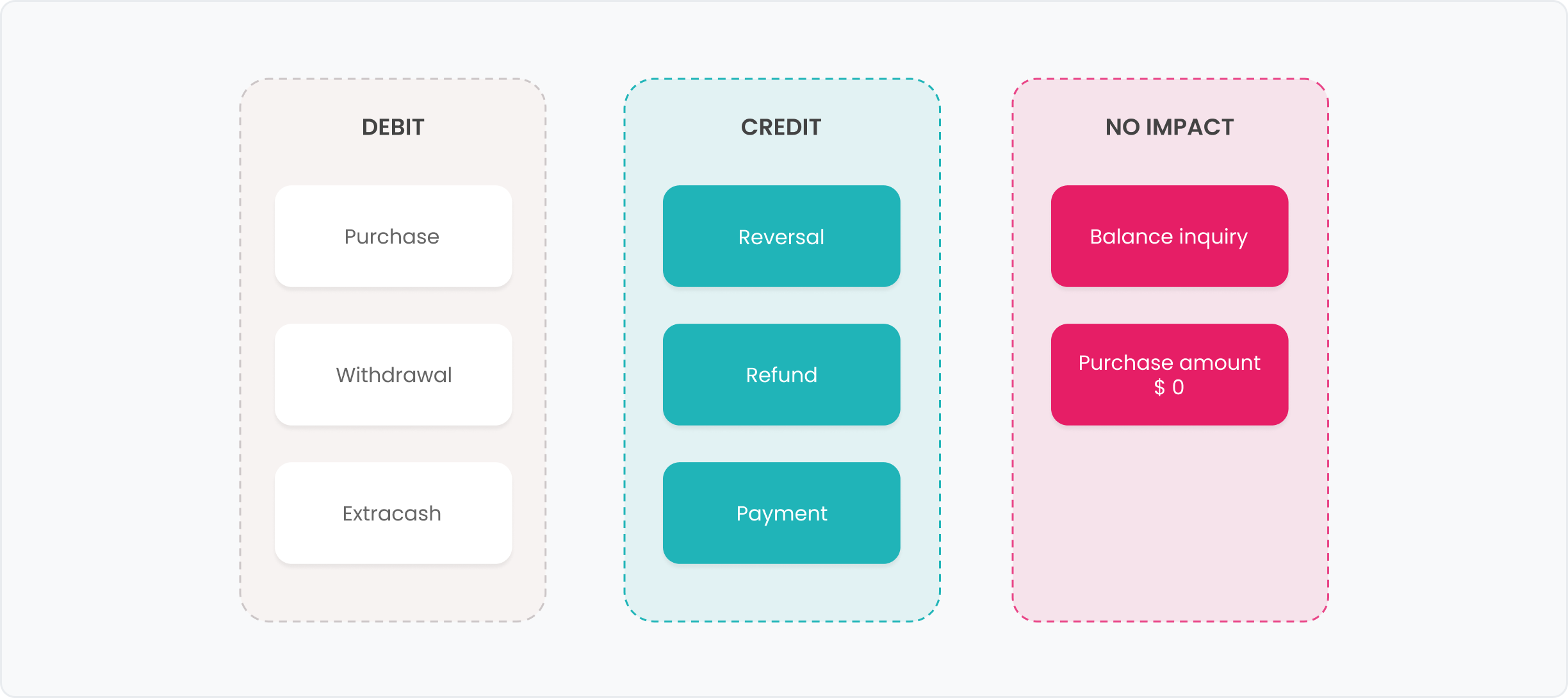
Debit
These are the operations in which you will have to subtract money from your customers' available balance or credit limit.
| Operation Type | Description |
|---|---|
| Purchase | These are physical or digital purchases at any type of store. |
| Withdrawal | These are cash withdrawals at ATMs. Important: currently, your customers from Argentina will not be able to make withdrawals abroad. |
| Extracash | These are purchases at stores that include a cash withdrawal, both in the same transaction. In the amount_details field, you will be able to see the amount of the purchase and the withdrawal. |
When it comes to an operation that arrives through the Authorization flow, you will receive it via the Authorization endpoint. However, when it is a forced operation due to a flag or a correction that comes directly through the Compensation flow, you will receive it via the Adjustments endpoint.
Credit
These are the operations in which you will have to add money to your customers, either to their balance or their credit limit.
| Operation Type | Description |
|---|---|
| Reversal | These are reversals of other types of operations such as Purchase, Withdrawal, or Extracash. They occur for operations that are not presented, and generally occur on the same day as the original operation and will be associated with it through the original_transaction_id. |
| Refund | These are refunds of a previously made transaction. They occur for transactions that have already been presented and are generally given in the days following the original transaction. These operations will not be associated with a purchase or withdrawal since it is not possible to link them with the available data from the brand networks. |
| Payment | These are credit card payments or money deposits. |
You will receive Reversal and Refund type transactions via the Adjustments endpoint.
Payments that we receive through the authorization flow will be sent to you in real-time via the Authorize Credit Transaction endpoint, while payments that we receive directly through the compensation flow will be sent via the Adjustments endpoint.
Additionally, if the payment has a discrepancy during reconciliation or a manual adjustment, that correction will also be sent to you via the Adjustments endpoint.
No financial impact
These are operations where you don't have to subtract or add money. You will receive them through the Authorization endpoint.
| Operation Type | Description |
|---|---|
| Balance Inquiry | These are balance or available limit inquiries made by your customers at ATMs. Important: in some cases, this service has a cost that you will have to deduct from your customers' balance or available limit. |
| Purchase amount $ 0 | This type of transaction is used by stores to validate if the card is valid and active. |
Simulate Transactions
Use our Dashboard to simulate transactions and verify that your integration responds correctly to each use case. Learn more
Transaction statuses
At Pomelo, we work with three statuses for transactions that are immutable, meaning that they are final states. Let's take a look at each one!
| Status | Description |
|---|---|
| APPROVED | These are transactions that you approved. Adjustments cannot be rejected, so they will always have this status. |
| HELD | These are transactions that are pending on the Pomelo side. When a Refund arrives for authorization, we leave it in this state until its settlement arrives for security reasons, and then we execute a request from the Adjustments endpoint. |
| REJECTED | These are rejected transactions. |
Transaction status details
We'll tell you what the transaction status detail means.
| STATUS DETAIL | DESCRIPTION |
|---|---|
| CARD_NOT_ACTIVE | The card is not in the ACTIVE state, meaning it is blocked or not activated. |
| CARD_NOT_CONFIGURED | The card is missing configurations. |
| CARD_NOT_FOUND | We cannot find the card's PAN. |
| CLIENT_TIMEOUT | You took too long to respond to the transaction authorization. |
| CLIENT_UNAVAILABLE | We cannot connect to you or received a 5XX error. |
| CLIENT_SIGNATURE_ERROR | There is a failure in your API signature. |
| CRYPTO_ERROR | There is an error in the cryptograms (EMV). |
| DUPLICATE_TRANSMISSION_DETECTED | We received a repeated transaction from the brand networks. |
| EXPIRED_CARD | The card is in the EXPIRED state. |
| EXTRA_FIELDS | The message from the brand networks has unexpected fields. |
| INSUFFICIENT_FUNDS | You responded that the account has no funds. It is a state that you can respond with when authorizing the operation. |
| INTERNAL_ERROR | Our systems failed due to an unforeseen circumstance. |
| INVALID_AMOUNT | The transaction exceeds the defined limits. It is a state that you can respond with when authorizing the operation. |
| INVALID_CVV | The CVV received from the brand network is incorrect. |
| INVALID_EXPIRATION_DATE | The expiration date we received does not match the card's expiration date. |
| INVALID_MERCHANT | We reject the merchant due to fraud rules. It is a state that you can respond with when authorizing the operation. |
| INVALID_PIN | The PIN received from the brand network is incorrect. |
| PIN_TRY_LIMIT_EXCEED | Your customer entered the wrong PIN and reached the attempt limit. |
| INVALID_TRANSACTION | The transaction is invalid. |
| MISSING_FIELDS | The message from the brand network arrives with incomplete mandatory fields. |
| ORIGINAL_NOT_FOUND | We tried to make a refund of a transaction not found. |
| OTHER | We do not recognize the circumstances. It is a state that you can respond with when authorizing the operation. |
| RESTRICTED_USER | The customer does not have a user in the ACTIVE state. |
| SECURITY_VIOLATION | It exceeds a fraud threshold. |
| SERVICE_UNAVAILABLE | Your service or ours is down. |
| SYSTEM_ERROR | You indicated that there was an unexpected error. It is a state that you can respond with when authorizing the operation. |
| APPROVED | The transaction is approved. It is a state that you can return when authorizing. |
| TRANSACTION_NOT_PERMITTED | The type of transaction is not allowed in the affinity group. |
| REJECTED_FRAUD | The transaction was rejected by the fraud engine. |
| STOLEN_CARD | The card is in the STOLEN state. This state is not yet in use. |
| LOST_CARD | The card is in the LOST state. This state is not yet in use. |
| CARD_BLOCKED | The card is in the BLOCKED state. This state is not yet in use. |
| REJECTED_BY_EXTERNAL_ENGINE_FRAUD | Rejected transaction by an external fraud engine to Pomelo. |
| CARD_DISABLED | The card is in the DISABLED state. |
| NOT_DECLINED | The transaction is on manual review state on Pomelo's side |
| APPROVED_BY_STAND_IN | The transaction was approved by Pomelo's Stand In. |
| REJECTED_BY_STAND_IN | The transaction was rejected by Pomelo's Stand In. |
Frequently Asked Questions:
What is the automatic fuel dispenser?
It is a case of Purchase, also known as AFD, which only occurs at some gas stations in the United States. You will need to authorize the initial transaction, which is a very small amount to validate the card. When your customer finishes refueling, you will receive an "advice" from the networks. We will leave that authorization with a "HELD" status until the presentation arrives, and then we will execute an adjustment to force the difference with the original transaction.